
Help Center / Account and funds
Add funds to your balance
Written by the SMMFollows support team. Updated 2026-11-01.
Orders are paid from your balance, never at checkout. You add money first, then every order you place is deducted from it. This is also why one balance can serve a whole reseller panel.
Steps
- Open Add funds in the left menu.
- Pick a method from the list. Each entry shows its minimum and, where there is one, the bonus.
- Enter the amount and continue. You're redirected to the payment provider's own page; your card or wallet details are entered there, never on smmfollows.com.
- After paying you come back to the panel. The balance at the top updates once the provider confirms the payment. The Fund History tab on the same page lists every deposit.
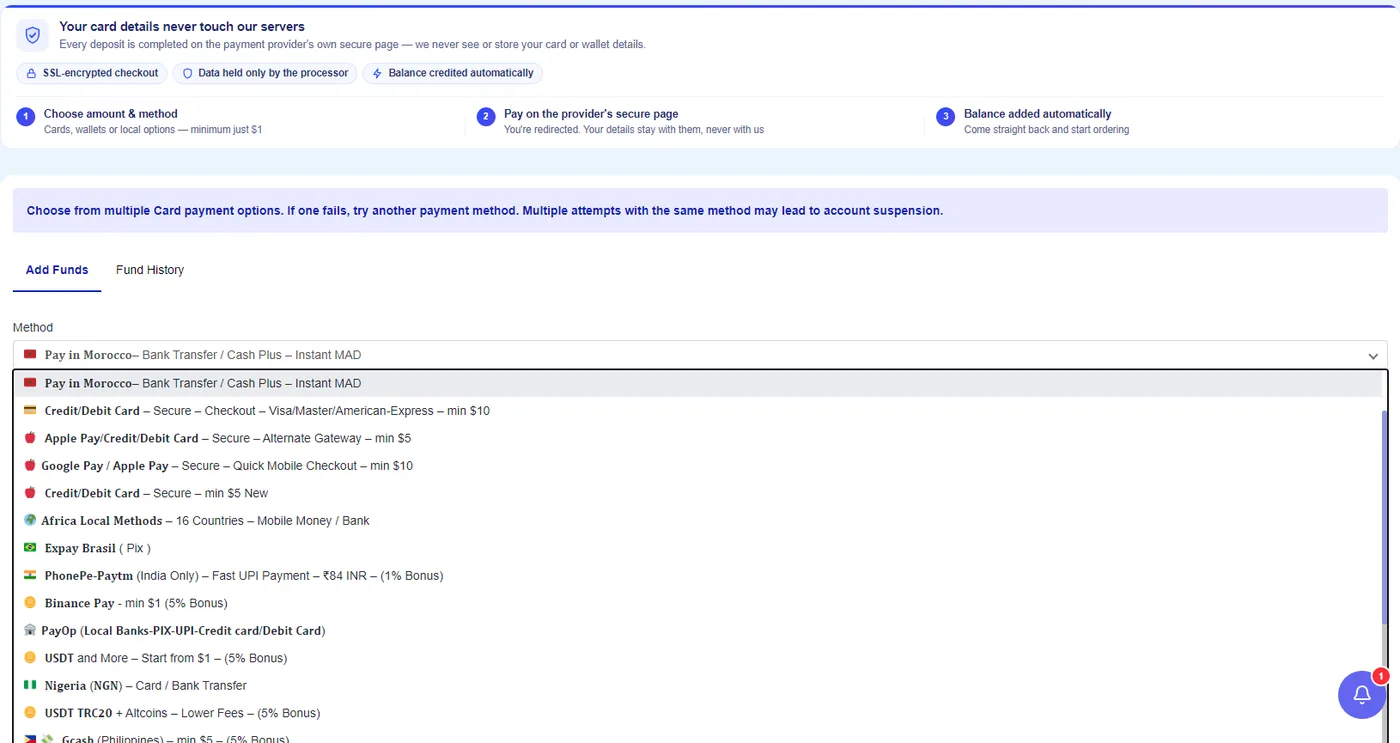
Payment methods
Minimums start at $1. This is the list at the time of writing; the Add funds page is always the current one.
| Method | Notes |
|---|---|
| Credit or debit card (Visa, Mastercard, American Express) | Secure checkout, minimum $10. A second card gateway with a $5 minimum is listed as an alternative if the first one fails. |
| Apple Pay and Google Pay | Minimum $5 to $10 depending on the gateway |
| Binance Pay | Minimum $1, 5% bonus |
| USDT (including TRC20) and other coins | From $1, 5% bonus; the TRC20 option has lower network fees |
| CoinPayments (BTC, LTC, ETH and more) | 5% bonus |
| Morocco: bank transfer or Cash Plus | Instant, in MAD |
| India: PhonePe and Paytm (UPI) | 1% bonus |
| Pakistan: CashMaal, EasyPaisa, JazzCash | Minimum $1 |
| Bangladesh: bKash, Nagad | Minimum $1 |
| Philippines: GCash | Minimum $5, 5% bonus |
| Brazil: Pix (Expay) | |
| Nigeria: card or bank transfer in NGN | |
| Africa mobile money (16 countries) | Ghana, Egypt, Kenya, Côte d'Ivoire, Cameroon, DR Congo, South Africa, Central and West Africa; minimum $1 |
| Vietnam: local bank transfer | |
| Alipay | |
| PayOp | Local banks, Pix, UPI and cards in one gateway |
| Redeem points | Converts the points you collect (there's a daily reward of 20 points) into balance |
If you run a child panel, this list is for paying us; your own customers pay you through gateways you set up yourself.
How long it takes
Cards, wallets and most local methods show up within a minute or two. Crypto is credited after the network confirmations the gateway requires, which can be ten to thirty minutes. Bank transfers depend on the bank.
The payment went through but the balance didn't change
- Wait ten minutes, reload, and check the Fund History tab.
- Check the payment status on the provider's side (your card statement, wallet, exchange). "Pending" there means it hasn't reached us yet.
- If it's confirmed on their side and still missing after an hour, open a ticket in the Payments category with the method, the amount, the time, and the transaction or reference ID. That ID lets us find it in minutes; without it we have to search by hand.
Didn't find what you needed? Open a ticket from your account and include the order ID if there is one. We reply around the clock.