
Help Center / Order status and problems
Order statuses explained
Written by the SMMFollows support team. Updated 2026-11-01.
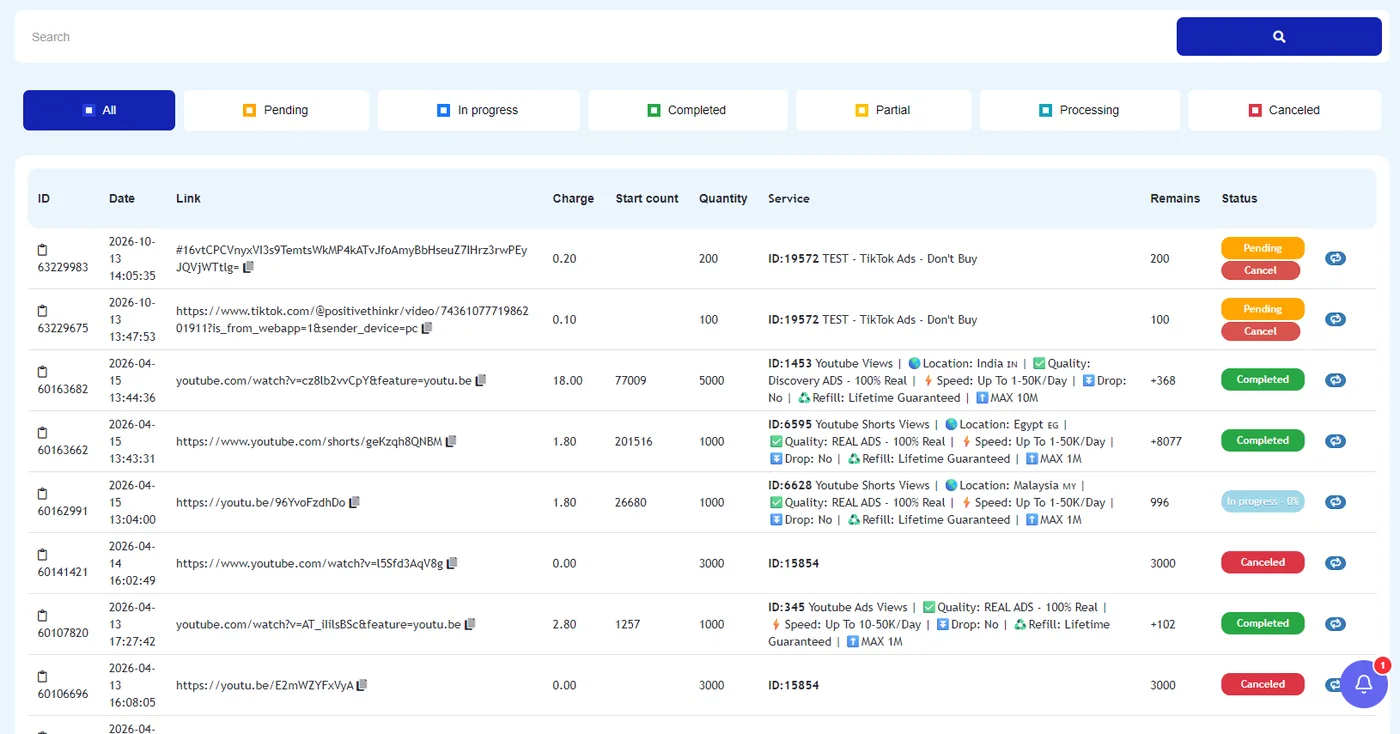
Every order on the Orders page shows a status, a start count and a remaining quantity. The buttons at the top filter the list by status. Here is how to read them.
| Status | What it means | What to do |
|---|---|---|
| Pending | We received the order and it's waiting its turn. Usually minutes; sometimes longer for slow-start services. | Nothing. Check the start time in the service description. |
| In progress | Delivery has started. The count on the page is increasing. | Wait. The remaining quantity goes down as units are delivered. |
| Processing | The order is between stages in our system. | Nothing; it moves on by itself. |
| Completed | The full quantity was delivered. | If the count later drops and the service has refill, request a refill. |
| Partial | Delivery stopped before the full quantity. | The undelivered part is refunded to your balance. See partial orders. |
| Canceled | The order was canceled before delivery. | The charge is back on your balance. |
Start count
The number of followers, likes or views the link had when the order started. Compare it with the current count to see what was delivered. If the start count is 0 on a page that clearly has followers, the service couldn't read the page, which usually means it was private or the link was wrong.
Remains
Units still to deliver. On a Partial order it is the amount that wasn't delivered and was refunded. On a Completed order you'll often see a number with a plus sign, such as +368: that is over-delivery, units sent on top of what you ordered. It's normal and not charged.
How long should each stage take?
There is no single answer; it's in the service description as "Start time" and "Speed". A service listed as "Start: 0–1 hour, Speed: 10K/day" can sit in Pending for an hour and then take a day for 10,000 units. If an order is well past those numbers, read my order hasn't started.
Didn't find what you needed? Open a ticket from your account and include the order ID if there is one. We reply around the clock.